Thursday, 2 February 2017

Know Who Has Read Your Whatsapp Group Message On Android & iPhone With This Trick

Harry
WhatsApp Messenger is a proprietary, cross-platform, encrypted instant messaging client for smartphones. Earlier, WhatsApp added blue tick feature to know whether the receiver has read the message or not. This feature can be seen in both android and iPhone users. Also, if you are a regular user of WhatsApp you might also know that double blue ticks are shown in Group messages only when all the users in the Group has read your message.

But it is just a bit tricky to find out who has read it and who has skipped it in group messaging. Would you like to know whether a particular person has read the message or not in the group in you android & iPhone?

This is how You Can Know Who Has Read Your Whatsapp Group Message on Android & iPhone:

  1. Firstly, Open WhatsApp on your device.
whatsapp
2. Tap on any group chat
whatsapp-groupchat
3. Tap and hold on your sent message, a menu will popup at the top of the screen.
whatsapp-group-message
4. Tap on ‘i’ (information) symbol located at the top right and iPhone users can tap on Info.
info
5. Now you can see a list of members who has read you message under ‘Read by’ section and whom it is delivered.
readby-deliverd-to
This is how we can know who has read the WhatsApp Group Message on iPhone and Android.

Re-Loader v3.0 Beta 3 : Windows 10 & Office 2016 Activator is Here !

Harry
Re-Loader Activator
This is application the loader activation all versions of Windows and Office 2010, Office 2013, Office 2015 , Office 2016. You may thinking what to choose. Either Kmspico, Reloader or some other Activator. Simply use what you want. This tool is more light weight, but does what its intended to do : Let you use Windows and office products forever. Simple as that. Let us know when this worked for you. If you got an issue we got your back, simply comment below and we’ll be here to help you. Also more information is given below
The following versions of Windows can be activated with this Loader…
Windows XP
  • Home Edition SP3
  • Professional SP3
  • Media Center Edition 2005 SP3
Windows Vista
  • Enterprise
  • Enterprise N
  • Business
  • Business N
  • Starter
  • Home Basic
  • Home Basic N
  • Home Premium
  • Ultimate
Windows 7
  • Enterprise
  • Enterprise N
  • Enterprise E
  • Starter
  • Home Basic
  • Home Premium
  • Professional
  • Professional N
  • Ultimate
  • Embedded POS Ready
  • Embedded
  • Embedded Thin PC
Windows 8
  • Enterprise
  • Enterprise N
  • Core
  • Core N
  • Core ARM
  • Core Country SpecIFic
  • Core Single Language
  • Professional
  • Professional WMC
  • Professional N
Windows 8.1
  • Enterprise
  • Enterprise N
  • Professional
  • Professional N
  • Professional WMC
  • Core
  • Core Connected
  • Core Connected N
  • Core Connected Single Language
  • Core Connected Country Specific
  • Professional Student
  • Professional Student N
  • Core ARM
  • Core N
  • Core Single Language
  • Core Country Specific
  • Embedded Industry A
  • Embedded Industry E
  • Embedded Industry
Windows 10
  • Professional
  • Professional N
  • Education
  • Education N
  • Enterprise
  • Enterprise N
  • Enterprise 2015 LTSB
  • Enterprise 2015 LTSB N
  • Home
  • Home N
  • Home Single Language
  • Home Country Specific
Windows 10 TP
  • Home Connected
  • Home Connected N
  • Home Connected Single Language
  • Home Connected Country Specific
  • Professional Student
  • Professional Student N
  • Professional 2015 LTSB
  • Professional 2015 LTSB N
  • Home ARM
  • Professional WMC
Windows Server 2008
  • ServerDatacenter
  • ServerDatacenterV
  • ServerEnterprise
  • ServerEnterpriseV
  • ServerEnterpriseIA64
  • ServerStandard
  • ServerStandardV
  • ServerComputeCluster
  • ServerWeb
  • ServerSBSStandard
  • ServerWinFoundation
  • ServerHomeStandard
  • ServerSolution
  • ServerHomePremium
Windows Server 2008 R2
  • ServerDatacenter
  • ServerEnterprise
  • ServerEnterpriseIA64
  • ServerStandard
  • ServerEmbeddedSolution
  • ServerHPC
  • ServerWeb
  • ServerSBSPrime
  • ServerSBSStandard
  • ServerStorageStandard
Windows Server 2012
  • ServerDatacenter
  • ServerStandard
  • ServerMultiPointPremium
  • ServerMultiPointStandard
  • ServerSolution
  • ServerWinFoundation
  • ServerStorageStandard
  • ServerStorageWorkgroup
Windows Server 2012 R2 / 2016 TP
  • ServerStandardCore
  • ServerStandard
  • ServerDatacenterCore
  • ServerDatacenter
  • SolutionCore
  • Solution
  • ServerCloudStorageCore
  • ServerCloudStorage
  • ServerStorageStandard
Windows Server 2016 Next-Gen
  • ServerARM64
  • ServerHI
What’s New ?
  • Still a Fix in the activation phase OEM .
  • Faster ulteriormento activation process Win7 OEM .
How to Use it For Activating Windows and Office ?
  1. Disable your antivirus
  2. Now run the “.exe” file from the .zip file and click on Accept button
  3. Now click on product icon which you want to activate
  4. Click activate and after a few seconds your product is activated
  5. That’s it. Enjoy !
Screenshots
Downloads

Ramboat: Hero Shooting Game v3.10.3 + Mod

Harry
Download Ramboat: Hero Shooting Game v3.10.3 + Mod - Android APK game for tablet or phone download it for free in our website. Beside this one we have hundreds of other full versions of the best android games, modded games and apps in our collection. Daily updates.

Ramboat: Hero Shooting Game v3.10.3 + Mod

Ramboat: Hero shooting game – control a hero speeding on a fast boat and destroying the most different enemies with accurate shoots from powerful weapons. Speed along the water surface and avoid numerous traps in this game for Android. Ride your boat along the coast firing soldiers and military equipment on the land. Shoot down planes and helicopters. Sink enemy boats and beware of submarines. Collect money and useful bonuses. Unlock unique character like a pirate, a cyborg, a mafiosi, etc. Buy different boats.


Downloads

Wednesday, 1 February 2017

Why and How To Protect Adsense Account From Invalid Clicks?

Harry
Do you know your Adsense Account is in danger, yeah this is not an April fool prank or anything like a joke, this is as true as you are breathing from some past days many bloggers experiencing heavy invalid activity in their Adsense account.
You may have also experienced that number of clicks are much more than as comparison of the Estimated Earnings, especially from some countries like United states clicks are coming fluently but no money, CPC from such countries lies somewhere between $0.01 – $0.04 which is too less and this Cost per Click clearly saying that these clicks you are getting on your Ads are not Genuine for sure.
Many Bloggers and Webmasters have lost their Adsense Ads in some past days because of this invalid activity or some other reasons.
Zac Johnson lost his 10 years old adsense acccount. Read his story
Just few days ago,  Theodore had been slapped by adsense. Read his story
and also because of their unawareness, so this is highly recommended that you won’t make such mistakes and keep your Adsense Account safe and secure.

How to know the Country from where invalid clicks are coming from ?

Many of you may already know about this but some don’t, so let me explain how to know from which country your Adsense Ads are getting unusually clicked, to find this out just follow these steps…
1.    Log in to your Adsense Account.
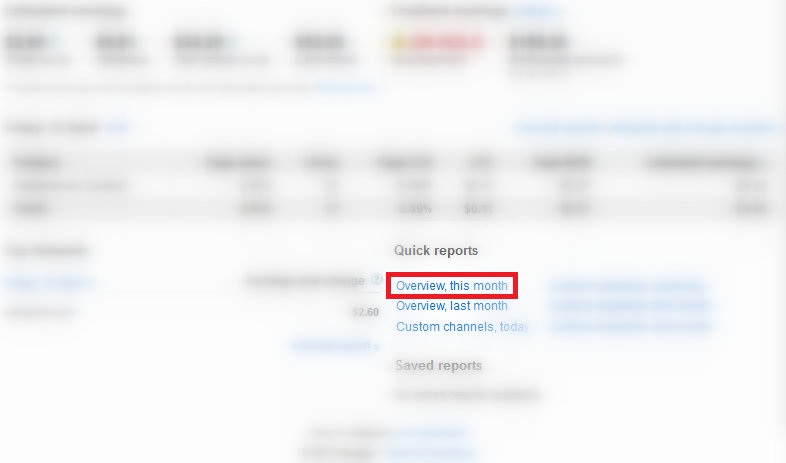
2.    Click on Overview this month.
Overview this month
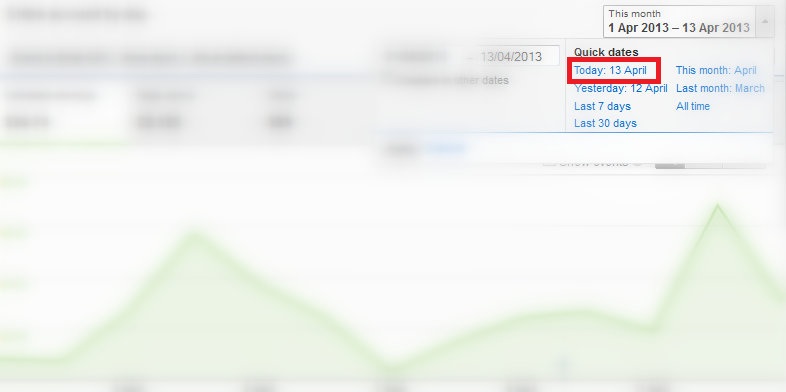
3.    Select the Today date from the upper right corner.
see todays Adsense report
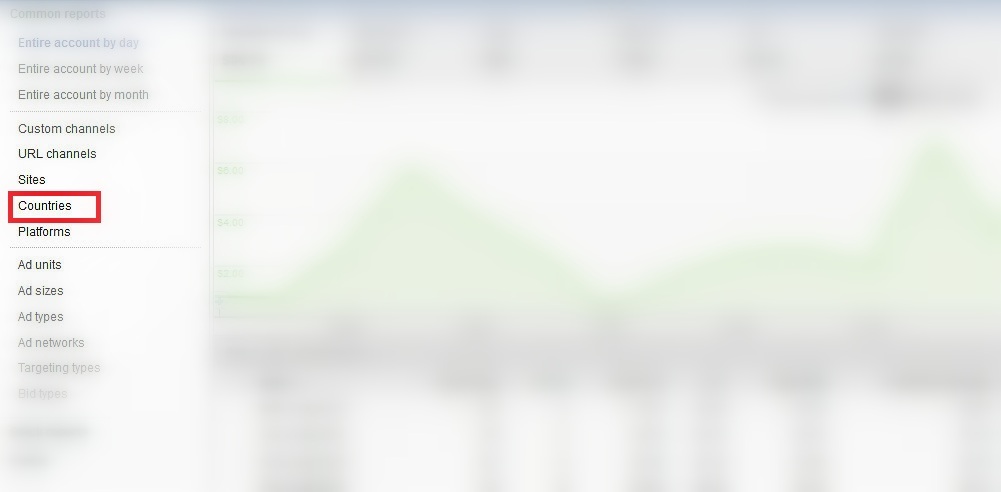
4.    Now click on Countries from Left sidebar.
click on countries
5.    Now carefully checkout the no. of clicks in front of each Country name.
Fullscreen capture 4132013 91705 PM
If you detect any country from where clicks have been done but CPC from there are very low then it simply means that your Adsense Ads are in danger.

How to Protect Your Adsense Account?

See if you are getting unusual clicks on your Ads, then first of all you try to detect the IP(s) of clicker and if you successfully detect those IP’s then just block them to showing Ads so that they won’t see your Ads and this way they cannot click on your Ads.
If you’re unable to fetch the IP address from where clicks are being performed then you most recommended way to keep your Adsense account safe is that, you must stop showing ads on your site for at least sometime, because if you stop publishing ads on your sites for some time/days it may cause loss of some Dollars to you but if you cannot prevent it then you may loss your Adsense for forever, which sounds so bitter to any blogger.

9 Things to Do Before Applying for Google AdSense + FREE Bonus Checklist 2017

Harry
So, you want to apply for Adsense to make some money from your blog and enjoy the life you always dream of?
Who does not anyway? That’s the dream of every blogger to get AdSense approved.

But, wait..
I’ve to tell you something.
That’s not easy. Google AdSense is very strict when it comes to approving new application. Everyone is trying to trick AdSense to get approved so they have made the process very hard.
Don’t worry. You’re not alone.
In this article, I’m going to share with you everything that you need to do before applying for Google AdSense program to actually get approve.
Some common questions that you may have about Google AdSense are…
How to apply for Google AdSense?
Does my blog qualify for AdSense or not?
Am I eligible to apply for Google AdSense?
What are Google AdSense requirements?
Why Google AdSense rejected my application?
What to do if Google AdSense reject my application?
This post is going to answer all your questions in detail. It’s over 3000+ words so grab a cup of coffee.. ;)

WHY GOOGLE ADSENSE IS SO POPULAR?

Google AdSense is one of the oldest networks to offer ad publishing and works at Pay Per Click system.
When it comes to the legitimacy of Google AdSense, it speaks for itself. Google AdSense have thousands and thousands of satisfied customers and publishers. AdSense pays on time, every time.
One more reason for choosing Google AdSense is that we can earn huge amounts of money if we do our work in right way. There are many bloggers who are making a complete living from their blogs and Google AdSense.
Therefore, Google AdSense should be the number one choice among all the other available networks.
It’s paying rates are better than all of other networks so that’s the biggest reason it is so popular among bloggers.
But since everybody is running behind them, they have made the approval system very strict. You make little mistakes and get disapproved every time. Here are few reasons why Google will reject your AdSense application.

COMMON ADSENSE REJECTION REASONS

Here are the most common rejection reasons and Google AdSense requirements that you should keep in mind before we get into details.

1.  Insufficient content / Unacceptable site content

Your website doesn’t have enough text on for Google specialists to review.
Google gives a lot of value and attention to the content of the blog before accepting it. If the content is poorly written and has grammatical mistakes Google will reject the blog right away.
Not only the content needs to be grammatically correct, it must be unique and has to provide value to the users and readers of the blog. So the number one reason is the poorly written content on your blog.

2. Page Type / Design of your blog

What will you do if you land a page with full bright yellow background with white text on it, having huge buttons all over the place?
Yes, you’ll never visit that website again .
Blogs which are poorly designed and are hard for the visitors to understand gets rejected by Google AdSense. You must have a good and neat design which comforts the eye and is beautiful in the look.

3. No Privacy Policy, About Us or Contact Us page

There are some pages which you must have before applying to Google AdSense if you want to get accepted.
These are about us, privacy policy and contact us pages. These pages give the impression that you are a professional and that you are working according to the Google policies. Keep in mind that having a privacy page is also one of the requirements for Google AdSense.

4. Site Does Not Comply With Google AdSense Policies

No rich, unique and meaningful content, no organic traffic, pages with little to no original content or bad user experience through clear navigation and organization.
Your website may be the one that drives traffic through illegal sources, sites with excessive keywords or poorly coded design are usually rejected.
So you need a complete guidance and list of things that you need to do before applying for Google AdSense.

THINGS TO DO BEFORE APPLYING FOR ADSENSE

1. Write High-Quality Content:

The #1 thing you need to do before applying for Google AdSenseis to write high-quality content. This is very important thing which you can’t ignore at any cost. I mean it!
Google loves the blog who are providing high-quality content and their visitors are enjoying it. Keep in mind that your application will be reviewed by humans and you have to impress them to get approved by AdSense.
A high-quality content…
  • is unique and original
  • with proper headings and bullet lists
  • free from grammar and spelling mistakes
  • is long enough
  • useful and informative

2. Create Privacy Page for Your Blog:

One of the common mistakes that most new bloggers. Even though there are people out there who say that having a privacy policy for a blog doesn’t make sense but they are wrong!
The first thing you will need to apply for Google AdSense and get approval is the privacy policy of your blog or website. If you don’t have it you cannot get approval simple is that.
Why is it important?
It’s requirement of AdSense and secondly, this privacy policy means you are not a scam and gives the sense of a serious business. Google will check the rest of the conditions only if you have this policy.
A privacy actually describes to your readers about what they will get on your blog , what they should do and what they should not. So obviously there is nothing bad in having a privacy policy. While it can affect somehow on your AdSense approval, you must give it a try.
You can write it yourself or find Privacy Policy Generators online (You don’t need a lawyer anyway).

3. Create About Page:

Like privacy policy, you must have an about page so that you can get approved. This also shows that there is a real person behind the blog.
An About page has a major role and importance even if you don’t want to apply for AdSense. But when it comes to AdSense, they are about zero chances of getting approved if you are not showing this page.
About page simply describe you and your blog . This will not only help you establish a relationship with readers but it will also make them trust you.

4. Setup A Contact Us Page:

It’s quite obvious that everyone has his/her own opinion.
What one of your readers likes may be bothering someone else. Then it is better to give them an opportunity to speak up to you and tell how they feel about your blog, what they want to be edited , what they liked or hated.
Create a contact page, if possible add your email that you are going to apply for Google AdSense. If possible do get some professional email address like ammar@allbloggingtips.com and your social profile links too.
By creating this you are telling Google that we care for our customers, visitors and we are ready to help them. They can contact us anytime.
It will also show the Google AdSense Team that is viewing your site that you actually care about your readers and not only the money and AdSense.
Check out my contact page to get some idea.
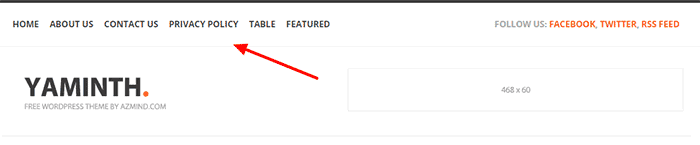
One important step: Google AdSense mention in their rejection email that your website should have a clear navigation menu to help your readers find your pages and access the content before you think about applying again for AdSense.
So, what you’ve to do is to work on your menu by adding all important categories and pages i.e about us, contact us and privacy policy to help your readers easily find the content that they are looking for. The more you care about improving your visitors experience the higher chances will be to get approved by AdSense.
Here’s an example to illustrate this point.
add important pages to adsense

5. Verify Your Name and Email:

When you apply don’t forget to put your name and email address in some easily visible area like about and contact pages. It will confirm to Google AdSense team that it is the same person who applied for AdSense and not some spam, crappy bots.
This will speed up the verification process and within no time, you’ll be able to enjoy fully approved AdSense account.

6. Have Some Good Number Of Posts:

What should be the minimum number of posts before applying for Google AdSense? There is no confirmed answer.
Not even one.
Because I have seen very established blogs with 300+ posts and their owner telling me that Google AdSense is rejecting them while somewhere bloggers with few posts or even less than 10 are enjoying making money with AdSense.
Exactly, what I said that there is no actual answer. However, we can always predict things.
According to my experience, the best time to apply for AdSense account is when you have at least 20 good quality posts. Your blog posts length should be at least 600+ words with quality content.
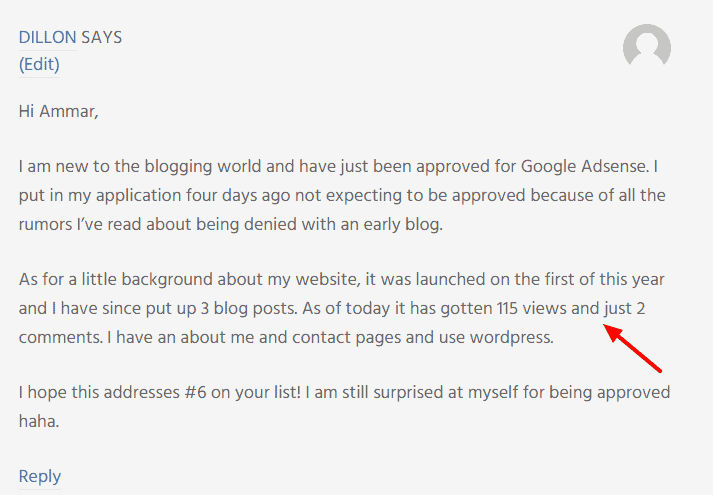
Dillon got his AdSense account approved with just 3 posts, 115 views, and 2 comments. Isn’t that great?
I visited his blog and noticed these things that actually matters to get Adsense approved.
  • Simple and clean design
  • Easy to navigate blog
  • Unique niche
  • Detail content
  • No “unwanted” widgets
minimum requirement for posts

7. Make Sure You’re 18+

This is the mistake that new bloggers are making who are less than 18. They write incorrect age and get into trouble.
Use your correct date of birth and age while applying for Google AdSense account.
Because Google AdSense is not for people who are under 18. Some people realize this problem after being disproved a few times without any legitimate reason.
So I advise you to be accurate while typing your age.

8. Improve Your Blog Design:

As mentioned earlier, you blog design matters a lot. It should be professional and not like a messy photo gallery. A clean, professional and fast-loading design is appreciated by Google.
When you visit a website what’s the first thing you look for? It’s blog design.
You’ve to build a good first impression on your blog readers to engage them.
Your blog design is the biggest thing after content. This represents your expertise, experience, and professionalism. It should have following features:
  • Simple and professional
  • Easy to navigate
  • Proper menus
  • No useless items in sidebar or footer
  • Search engine friendly
  • Fast loading
So be careful because anything can kill your chances of getting approved by AdSense.
There are thousands of websites who provide free professional looking themes for your blog. All you need to do is to search for them.
If you’re on WordPress self-hosted blog then I recommend getting a premium theme from MyThemeShop.
And if you are still using blogspot then there are many great websites where you can find free professional looking blogger templates for your blog.
Check out my post on the reasons to invest more money on your blog.

9. Check Your Content Type:

Be careful with what type of content you are publishing. Because it is something that truly matters.
Here are some common content types that are not accepted by AdSense.
  • Pornography/Adult materials
  • Pirated Content
  • Hacking or Cracking Tutorials
  • Illegal Drugs/Paraphernalia
  • Any Other Illegal Stuff
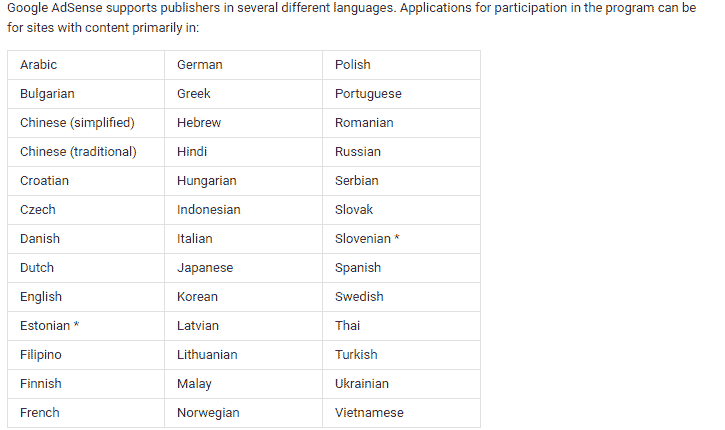
  • There are few languages that are supported by AdSense so make sure your blog language is in the list of these.
AdSense supported languages
Google AdSense team mentioned in one of their forum posts that they stopped accepting niches that are already saturated i.e making money, marketing, website and SEO stuff. 


CEH Certified Ethical Hacker Full Coures PDF File

Anonymous
DISCLAIMER: Following data/info/files are not owned/made/uploaded by latesttrickes On our last article about a lot of people asked about CEH v9, so here it is; full PDF CEH v9 Course.

Here Download Also Module and Lab PDf File..


Name Of Topics:-


CEHv9 Module 01 Introduction to Ethical Hacking
CEHv9 Module 02 Footprinting and Reconnaissance
CEHv9 Module 03 Scanning Networks
CEHv9 Module 04 Enumeration
CEHv9 Module 05 System Hacking
CEHv9 Module 06 Malware Threats
CEHv9 Module 07 Sniffing
CEHv9 Module 08 Social Engineering
CEHv9 Module 09 Denial-of-Service
CEHv9 Module 10 Session Hijacking
CEHv9 Module 11 Hacking Webservers
CEHv9 Module 12 Hacking Web Applications
CEHv9 Module 13 SQL Injection
CEHv9 Module 14 Hacking Wireless Networks
CEHv9 Module 15 Hacking Mobile Platforms
CEHv9 Module 16 Evading IDS, Firewalls, and Honeypots
CEHv9 Module 17 Cloud Computing
CEHv9 Module 18 Cryptography


 Download Full Module PDF Click Here

 Download Full Lab PDF Click Here


Note: First Download Full Module(For Understand) and Then Download Full Lab Pdf......
Enjoy ......Keep Visit..
:))

CEH v9 – Certified Ethical Hacker v9 Course PDF

Anonymous
 

This is the worlds most advanced ethical hacking course with 18 of the most current security domains any ethical hacker will ever want to know when they are planning to beef up the information security posture of their organization. In 18 comprehensive modules, the course covers 270 attack technologies, commonly used by hackers

Download CEH v9 modules (Books)

CEHv9 Module 00.unlocked.pdf
CEHv9 Module 01 Introduction to Ethical Hacking (1).pdf
CEHv9 Module 02 Footprinting and Reconnaissance (1).pdf
CEHv9 Module 03 Scanning Networks (1).pdf
CEHv9 Module 04 Enumeration (1) (1).pdf
CEHv9 Module 05 System Hacking (1).pdf
CEHv9 Module 06 Malware Threats (1).pdf
CEHv9 Module 07 Sniffing (1).pdf
CEHv9 Module 08 Social Engineering (1).pdf
CEHv9 Module 09 Denial-of-Service (1).pdf
CEHv9 Module 10 Session Hijacking (1).pdf
CEHv9 Module 11 Hacking Webservers (1).pdf
CEHv9 Module 12 Hacking Web Applications (1).pdf
CEHv9 Module 13 SQL Injection (1).pdf
CEHv9 Module 14 Hacking Wireless Networks (1).pdf
CEHv9 Module 15 Hacking Mobile Platforms (1).pdf
CEHv9 Module 16 Evading IDS, Firewalls, and Honeypots (1).pdf
CEHv9 Module 17 Cloud Computing (1).pdf
CEHv9 Module 18 Cryptography.pdf

Download CEH v9 modules (Tools)


CEHv9 Module 02 Footprinting and Reconnaissance.zip - 143.8 MB
CEHv9 Module 03 Scanning Networks.zip - 170.9 MB
CEHv9 Module 04 Enumeration.zip - 12.7 MB
CEHv9 Module 05 System Hacking.zip - 489.3 MB
CEHv9 Module 06 Malware Threats.zip - 79.7 MB
CEHv9 Module 07 Sniffing.zip - 86.6 MB
CEHv9 Module 08 Social Engineering.zip - 116 KB
CEHv9 Module 09 Denial of Service.zip - 39.5 MB
CEHv9 Module 10 Session Hijacking.zip - 87.7 MB
CEHv9 Module 11 Hacking Webservers.zip - 293.5 MB
CEHv9 Module 12 Hacking Web Applications.zip - 20.6 MB
CEHv9 Module 13 SQL Injection.zip - 691.1 MB
CEHv9 Module 14 Hacking Wireless Networks.zip - 71.4 MB
CEHv9 Module 15 Hacking Mobile Platforms.zip - 13.1 MB
CEHv9 Module 16 Evading IDS, Firewalls and Honeypots.zip - 36.5 MB